Adobe is the industry leader when it comes to creative design — and logo design is no exception. From vector creation to typography and color management, Adobe tools offer unmatched control, scalability, and professional output.
1. Adobe Illustrator – The Industry Standard for Logo Design
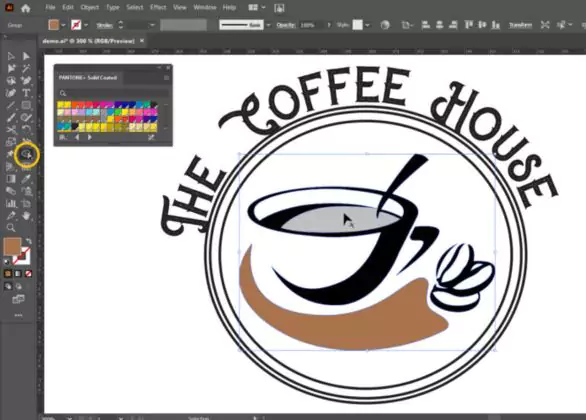
Adobe Illustrator is the gold standard for creating logos. As a vector-based design tool, it allows for infinitely scalable graphics without any loss in resolution, making it ideal for logos that need to appear on everything from business cards to billboards. Illustrator’s precision drawing tools like the Pen Tool and Shape Builder make it easy to craft unique, custom shapes. The typography capabilities are equally robust, giving designers full control over font choice, kerning, and layout. Color tools in Illustrator ensure your branding remains consistent, and the software supports seamless exporting across formats.
2. Adobe Express – Fast & Easy Logo Creation for Beginners
Adobe Express is a web-based design tool ideal for users looking for a fast, user-friendly experience. It’s perfect for beginners or small business owners who want to create a logo without diving into professional design software. Adobe Express offers customizable logo templates, a vast library of icons and shapes, and intuitive editing tools. Users can quickly create polished logos with pre-set fonts and brand colors. With AI-powered features and integrated brand kits, Adobe Express simplifies the logo creation process while still delivering attractive results.
3. Adobe Photoshop – Perfect for Logo Mockups and Branding Scenes
Adobe Photoshop, while not a vector-based tool, plays a critical role in the branding journey. It’s particularly useful for creating high-quality mockups to show clients how a logo will appear in real-world settings, such as on apparel, signage, or websites. With its layer-based editing, designers can add realistic lighting, shadows, and textures to their logo presentations. Photoshop also supports Smart Objects, allowing you to place your logo onto mockups and maintain editability. Though not typically used for designing logos from scratch, Photoshop enhances the visual storytelling around a brand’s identity.
4. Adobe Fresco – For Hand-Drawn and Artistic Logo Concepts
Adobe Fresco is an ideal tool for illustrators or designers who want to create hand-drawn or artistic logos. It offers a natural drawing experience, combining the tactile responsiveness of traditional media with the precision of digital tools. Fresco supports both vector and raster brushes, allowing for intricate detailing or scalable graphics. Designers can sketch logo ideas freehand with a stylus, using live brushes that simulate watercolor or oil paint. This makes it particularly appealing for creating organic, custom brand marks with an artisanal feel.x
5. Adobe InDesign – For Logo Placement in Marketing Materials
Adobe InDesign, although primarily known for its layout and publishing capabilities, is highly useful for placing and managing logos in print and digital materials. It’s not meant for designing logos from scratch, but it becomes essential when integrating logos into marketing collateral such as brochures, catalogs, and business documents. With grid-based layout tools, InDesign ensures that logos are consistently placed and proportioned across different formats. It supports high-resolution linked files, which makes it easy to drop in Illustrator-created logos while maintaining image clarity and print quality.
When it comes to crafting logos from the ground up, Adobe Illustrator remains the top choice due to its powerful vector capabilities and unmatched precision. It’s the professional’s tool of choice for creating logos that look sharp in any size or context. However, Adobe’s broader suite of tools allows for a more dynamic and comprehensive workflow. Adobe Express is ideal for quick, template-driven logo creation, perfect for beginners or startups. Photoshop adds value through realistic logo mockups and branding visuals. Fresco offers a creative space for freehand illustrations, while InDesign helps place your final logo into print-ready designs with style and consistency.




 English
  Deutsch